
Buy with Prime lets you put the Prime badge and an Amazon checkout button on your own website, so shoppers on your store can buy with their Prime account and get fast Prime delivery, all fulfilled by Amazon. It is a real product with real upsides, and one of them is new: unlike selling through FBA on Amazon, Buy with Prime now hands you customer data. This article covers what it is, what you actually get, and the quieter trade that comes with it, so you can weigh it honestly against owning the customer relationship outright.
We will give Amazon its due here, because the honest version is more useful than the scary one. Buy with Prime solves things FBA never did. It also invites Amazon back into the one place a direct sale was supposed to be yours: your own checkout. Both are true, and neither one cancels the other.
What Buy with Prime Is
Buy with Prime is a checkout and fulfillment service for merchants who sell on their own website, not on Amazon. You add the Prime badge and a Buy with Prime button to your product pages. When a shopper uses it, Amazon fulfills the order from the same inventory pool it uses for FBA, through Multi-Channel Fulfillment, and handles the shipping, the returns, and the customer service. In plain terms, it bolts Amazon's logistics and its trusted badge onto a store you own. It opened to all US merchants in 2024 and is still expanding, so this is an active program, not a winding-down experiment.
How It Works
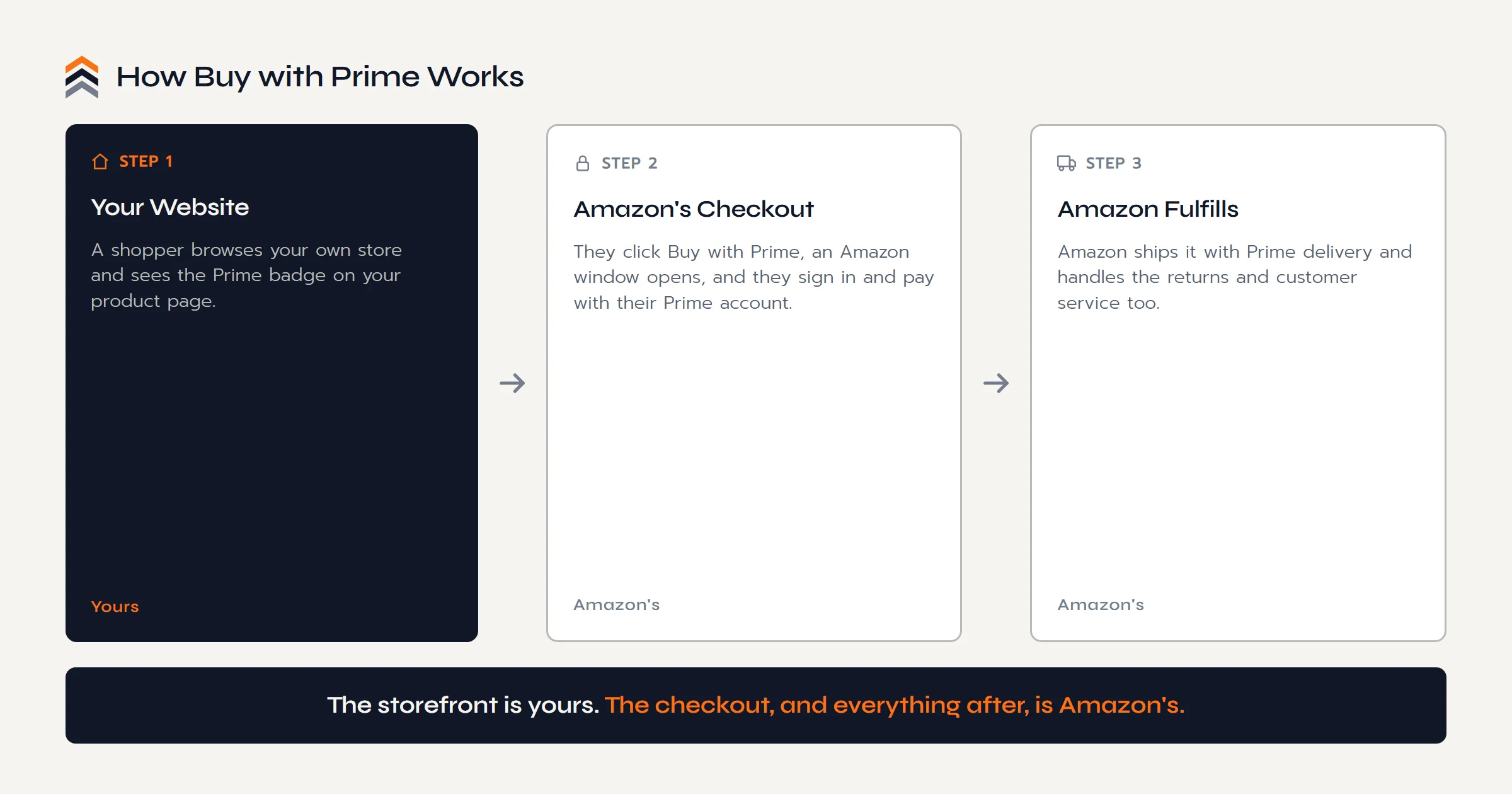
The shopper's path is short, and where it runs is the part to watch:
- They browse your site and see the Prime badge on your product page.
- They click Buy with Prime, and an Amazon window opens over your page. They sign in with their Amazon account, their saved Prime address and payment fill in, and the payment runs through Amazon Pay.
- Amazon ships the order with Prime delivery, and handles the returns and customer service for it.
So the storefront and the browsing are yours. The checkout moment, the login, and everything after the click belong to Amazon. Hold onto that, because it turns out to be the whole point.
The Data Myth, Corrected
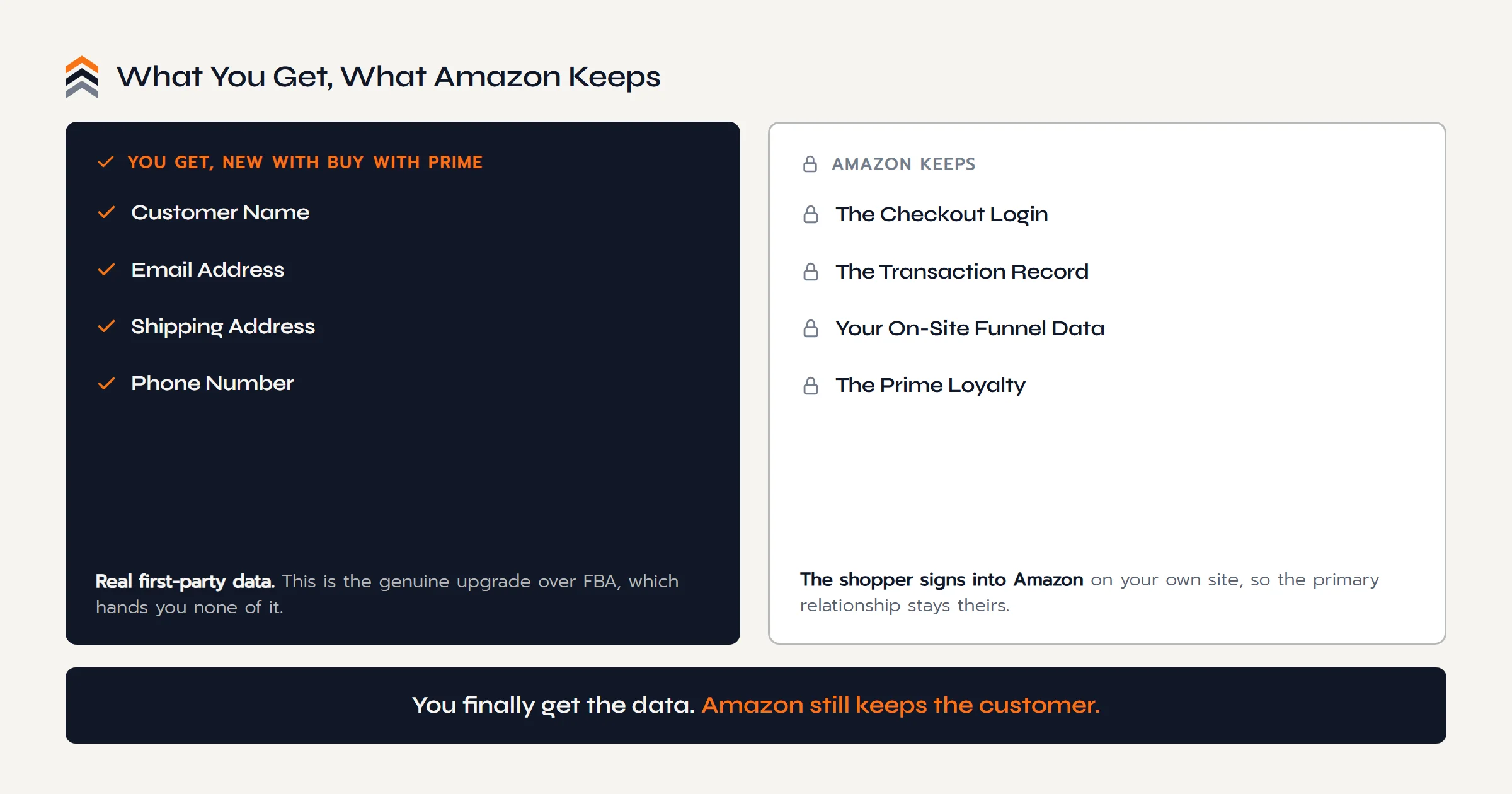
For years the standard knock on Buy with Prime was that you get no customer data. That is now out of date, and it is worth correcting plainly. According to Amazon's own current documentation, when someone buys through Buy with Prime, Amazon shares the shopper's information with you: name, email address, shipping address, and phone number. You are allowed to use it, within your privacy policy and the law, which means you can add those buyers to an email list you actually own and reach them directly. That is a genuine step up from FBA, where Amazon hands you next to nothing. Credit where it is due: on the data question, Buy with Prime is better than the marketplace.
So What's the Real Trade?
Here is the quieter half, and it is not the fees. When a shopper checks out with Buy with Prime, they log into Amazon to do it, right there on your site. So even as you receive their details, Amazon is back inside the transaction. It records the order, and it collects behavioral data on your own pages, how often shoppers view a Buy with Prime product and whether they complete or abandon the purchase, which it uses in aggregate across merchants to shape how it prices and promotes its services.
To be fair about the limits of that: Amazon states it does not use the private information from Buy with Prime to make sourcing, inventory, or pricing decisions for its own store. This is not the old fear of Amazon copying your product from your checkout data. The real issue is subtler and harder to shake. The customer signs in as a Prime member, gets a Prime delivery, and is served by Amazon if anything goes wrong. You get their email, but the loyalty, the habit and the trust and the account it all runs through, stays with Amazon. It is the same shape as Amazon Brand Registry: a genuinely useful tool that hands you something real while keeping the relationship anchored to the platform. Which is why, on its own, it does little to reduce your dependence on Amazon.
You finally get the customer's email. Amazon still gets the customer.
Whose Checkout Are You Really Building?
The Push Roadmap is a free 12 page PDF with the Ownership Scorecard. Put a number on how much of your brand you actually own today, and see the whole move mapped in order.
Sent straight to your inbox.
What It Costs
Cost is the weakest reason to hesitate, so we will keep it short. Buy with Prime charges a Prime service fee of about 3 percent per order, plus the per-unit fulfillment fees for Multi-Channel Fulfillment, plus storage and payment processing, with a new fuel and logistics surcharge added in 2026. Marketplace Pulse estimates the all-in cost runs roughly 20 to 40 percent of a transaction, and higher on cheap items because of per-order minimums. Those numbers are real, but they are not the point. Plenty of tools cost money and earn it. The question worth asking is not what Buy with Prime charges. It is what it quietly keeps.
Why We Don't Install It on Client Sites Yet
A note from the build side, since we get asked. We evaluated Buy with Prime and chose not to install it on the client sites we build, at least not yet, and the reason is practical rather than ideological. We build on WordPress and WooCommerce, and Amazon never made a native integration for it the way it did for Shopify, which got a proper app built into its checkout. On WooCommerce, Buy with Prime is a pasted-in Amazon checkout snippet plus a third-party middleware connector to sync the orders back. It does not run through WooCommerce's own cart and checkout, and on a custom checkout that mismatch is exactly the kind of thing that can break an order flow, an analytics setup, or a customer's purchase at the worst possible moment.
Our rule is simple: when something could break a client's store, the client's experience and their losses outweigh any badge we might gain. If Amazon ships a mature, native WooCommerce integration, we will happily reconsider. Until then, we would rather build the parts of a store we can stand behind completely, and leave out the one held together with tape.
So Is It Worth It?
For the right seller, Buy with Prime can absolutely be worth it. If you already run a Shopify store, if the Prime badge meaningfully lifts your conversion, and if letting Amazon handle fulfillment and support frees up a stretched team, the trade can make good sense. Amazon markets a lift of roughly 25 percent in conversion, though it is worth knowing that figure comes from Amazon's own data on a small sample of merchants, so treat it as a claim rather than a promise.
Just go in clear-eyed. Buy with Prime is a better deal than FBA on data, and a convenient bolt-on for logistics. It is not the same as owning your store end to end. It is Amazon's checkout on your website, which is a real improvement on Amazon's checkout on Amazon's website, but still a step short of a checkout that is fully yours, on a site you own completely.
An Honest Note
Two things can be true at the same time:
- It is a real upgrade on FBA. You get the data, the badge, and Amazon's logistics. If you use it, use it for exactly that.
- It is not full ownership. Amazon is still in the checkout and still holds the loyalty. Treat it as a feature you switch on, not a foundation you build on.
Let Buy with Prime handle the logistics. Build the relationship somewhere it is fully yours.
Questions Sellers Ask
What Is Buy with Prime?
Buy with Prime is an Amazon service that lets a merchant add the Prime badge and an Amazon checkout button to their own website. Shoppers buy with their Prime account and get fast Prime delivery, and Amazon fulfills the order, returns, and customer service. It brings Amazon logistics and trust to a store you own, not to Amazon.
Does Amazon Share Customer Data with Buy with Prime?
Yes. This is the key update to an old myth. Amazon's current documentation says it shares the shopper's name, email address, shipping address, and phone number with the merchant, who may use it within their privacy policy and the law. That is a real difference from FBA, where Amazon shares essentially no customer data.
What Is the Difference Between Buy with Prime and FBA?
FBA fulfills orders placed on Amazon.com. Buy with Prime fulfills orders placed on your own website, using the same Amazon inventory and logistics through Multi-Channel Fulfillment. The biggest practical difference is data: FBA hands you almost none, while Buy with Prime shares the customer's name, email, address, and phone with you.
How Much Does Buy with Prime Cost?
Buy with Prime charges a Prime service fee of about 3 percent per order, plus per-unit fulfillment fees, storage, and payment processing, with a fuel and logistics surcharge added in 2026. Marketplace Pulse estimates the all-in cost lands roughly between 20 and 40 percent of a transaction, and higher on low-priced items because of per-order minimums.
How Do Returns Work with Buy with Prime?
Amazon handles returns and customer service for Buy with Prime orders, the same way it does for FBA. Shoppers get the familiar Prime returns experience, which is convenient for a small team. The trade is that you hand control of that post-purchase moment, and the customer relationship inside it, back to Amazon.
Can I Add Buy with Prime to a WooCommerce Store?
You can, but not through a native integration. Amazon built a checkout-embedded app for Shopify, not for WooCommerce. On WooCommerce, Buy with Prime is a pasted checkout snippet plus a third-party middleware connector to sync orders. It does not run through WooCommerce's own checkout, which can cause conflicts on a custom-built store.
Is Buy with Prime Worth It?
It can be, for the right seller. If the Prime badge lifts your conversion and Amazon handling fulfillment frees your team, the trade can pay off, and you now get customer data too. Just know the limit: the shopper still signs into Amazon to buy, so the loyalty stays with Amazon, not you.
The Conclusion
So, what is Buy with Prime? A way to put Amazon's badge, checkout, and logistics on your own website, and, unlike FBA, to walk away with your customer's contact details. That last part is a genuine improvement, and we would not tell you to ignore it. But read the whole trade before you switch it on. The shopper still signs into Amazon to buy from you, Amazon still records the sale and keeps the loyalty, and on WooCommerce the integration is not yet solid enough for us to ship on a client's store.
Buy with Prime moves Amazon's checkout onto your land. That is real progress from selling only on Amazon. It just is not the finish line, because the checkout, and the customer inside it, are still Amazon's. The finish line is a brand you own end to end, where the whole sale, and everyone who makes it, belongs to you.
Your sales can live on Amazon. Your brand should not.
The Next Move
Amazon's Checkout on Your Site
Isn't the Same as Your Own.
Ready to Build
A free call, no pitch script. Walk us through your Amazon business and get a straight answer on what a store that is fully yours would take.
Book a Free CallStill Weighing It
The Push Roadmap is a free PDF with the Ownership Scorecard. Put a number on how much of your brand you actually own today.