
Google Shopping is the product listing experience spread across Google, the image, price, and store name you see when you search for something to buy, both in the dedicated Shopping tab and inside ordinary search results. Google does not sell anything itself; it surfaces products and sends the shopper to the seller's own site to check out. For an Amazon seller learning to build a brand beyond Amazon, that last detail is the whole reason it matters, and it is what the deeper guide to Google Shopping for Amazon sellers builds on. This piece explains what it is, how it works, and why it belongs in the toolkit of a brand that wants demand it owns.
What Google Shopping Actually Is
Think of Google Shopping as a product answer rather than an ad in the old sense. When someone searches for a specific kind of item, Google can show a row or grid of products, each with a photo, a price, and the name of the store selling it, so the shopper sees the essentials before they click. Those listings appear in the Shopping tab and increasingly in the main results, and, as of 2026, across other surfaces like Google Images and Google's AI answers too.
The important contrast is with a plain text ad. A traditional search ad is words, triggered by keywords the advertiser bids on. A Shopping listing is visual, and Google generates it from the store's product data, not from a keyword the seller picked. The shopper effectively pre-qualifies themselves: they can see the product and the price up front, so a click tends to come from someone closer to buying. That is a different, and often more valuable, kind of visit than a click on a wall of text.
How It Works, Feed to Listing
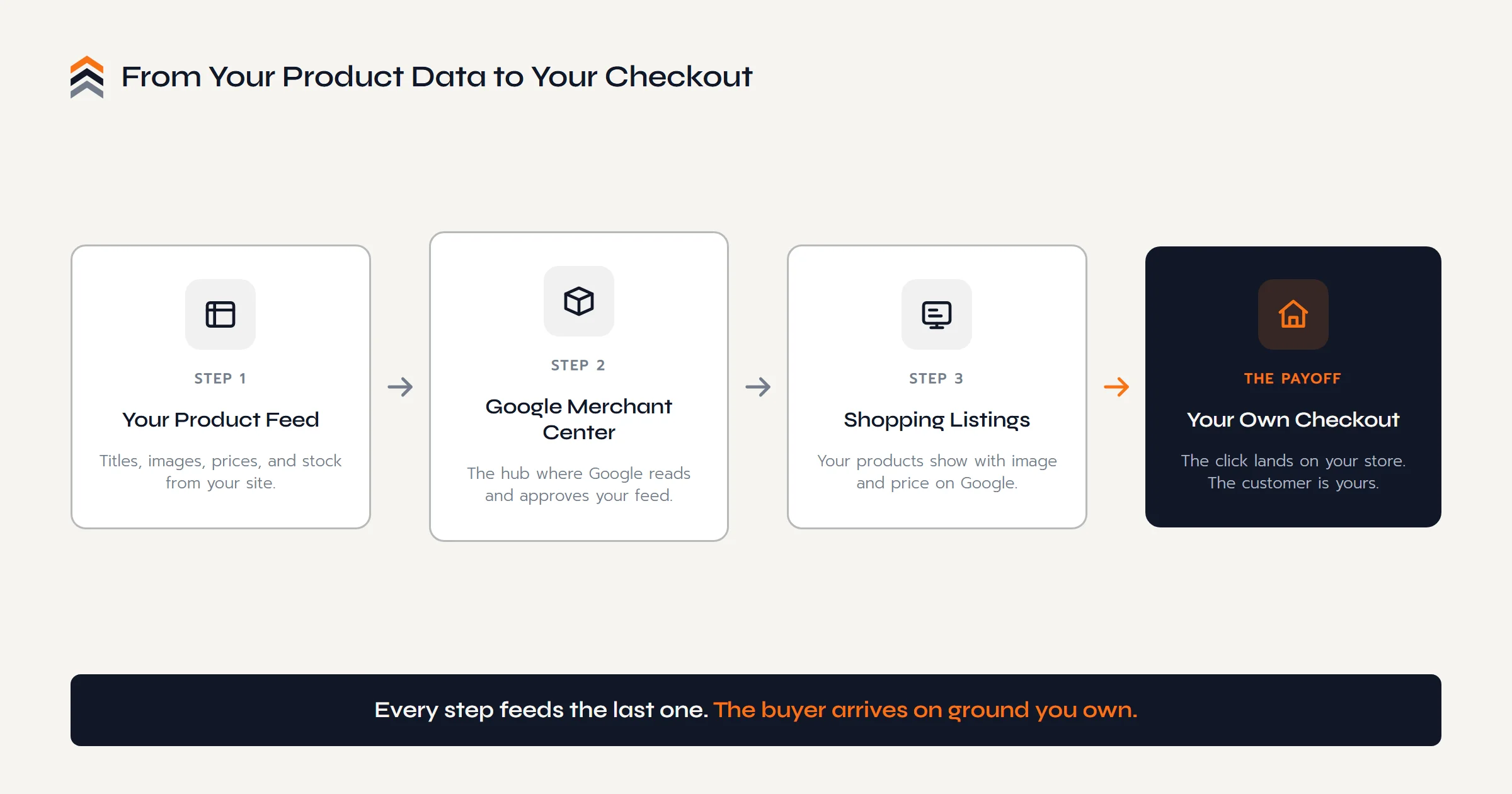
Underneath the tidy listing is a simple pipeline. It starts with a product feed, a structured file listing each of your products with its key attributes: a title, a description, an image, a price, availability, and identifiers like a brand or product code. You submit that feed to Google Merchant Center, the free hub that sits between your store and Google. Google reviews the feed, checks it against its rules, and, once your products are approved, they become eligible to show as listings.
You do not have to build that feed by hand. It can be a spreadsheet you upload, a file Google fetches on a schedule, or, most commonly, an automatic sync from your store. On the platform we build brands on, a plugin keeps the WooCommerce catalog and Merchant Center in step, so prices and stock stay current without manual work. However it is generated, the destination is the same: a click on your listing lands the shopper on your own product page, ready to buy from you. That end point, a checkout you control, is what ties this whole channel to the question of who owns your customers.
Free Listings and Paid Ads
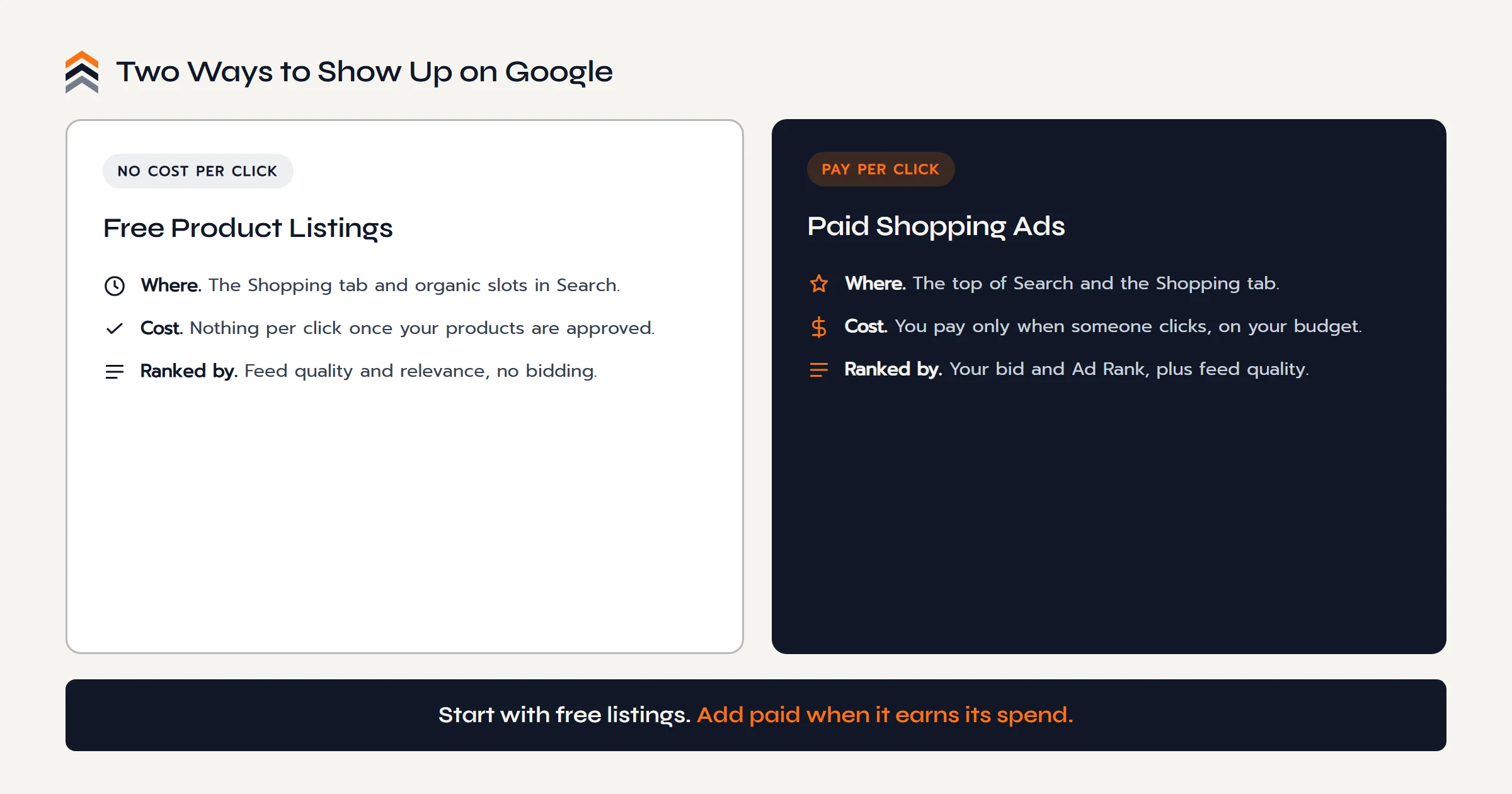
Here is the part that confuses most people, so it is worth stating plainly. There are two ways to appear in Google Shopping, and they are not the same thing. Free product listings run straight from Merchant Center at no cost per click; once your products are approved, they can show in the Shopping tab and in organic slots in search without any ad spend. Google opened these free listings up in 2020, and for a seller just starting out they are a genuine, no-risk way to get products in front of shoppers.
Paid Shopping ads are the second way. They buy the premium placements, the top of the search page and the top of the Shopping tab, and you pay only when someone clicks, within a budget you set. Google offers a couple of campaign types for this, from more hands-on Standard Shopping to the automated Performance Max, and the names and mechanics shift over time, so check the current options before you commit. The honest way to think about it: free listings are the floor everyone should stand on, and paid ads are a lever you pull when the numbers say it earns its keep.
Why It Matters for a Seller
Strip it back to the seller's real question, which is not what Google Shopping is but why it should matter to someone already doing well on Amazon. The answer is where the click lands. When a shopper finds you through Google Shopping and clicks, they arrive on your website and buy from you directly. You keep the customer relationship, their contact details, and the full margin, instead of handing all three to a marketplace. It is demand captured on Google, a place Amazon does not control, and pointed at a store you own. That is the same asset that makes first party data worth having, arriving through a new front door.
We have to be equally honest about what it is not, because our whole voice is built on not overselling. Google Shopping is a channel, not a growth guarantee. It only works if you have a real website with clean, accurate product data behind it, which is one more reason the basics of what a brand website needs come first. The best placements are pay-to-play, feeds need maintaining, and campaigns need tuning, often over weeks before they settle. Results vary from brand to brand and product to product, and no one can promise you a number. What we can say plainly is that it is a legitimate, ownable channel, and it sits naturally alongside the ecommerce SEO work that also pulls free demand from Google over time.
See Where a Channel Like This Fits.
The Push Roadmap is a free 12 page PDF that maps the whole move from Amazon to a brand you own, including the owned demand channels that send buyers to your door.
Sent straight to your inbox.
What You Need to Start
The barrier to entry is lower than most sellers assume, and it comes down to a short list. You need a working online store with real product pages, prices, availability, and secure checkout. You need a Google Merchant Center account, and you need to verify and claim your website inside it. You need a product feed submitted to Merchant Center, whether by spreadsheet, scheduled fetch, or a store plugin that syncs automatically. And if you want the paid placements, you need a Google Ads account linked to Merchant Center, though free listings need no ad account at all.
One thing trips sellers up more than any other, so it is worth calling out. Google checks that your site is a real, trustworthy business, which as of 2026 means accurate contact information, a visible return and refund policy, a shipping policy, and product data that matches what is on the page. Mismatched prices or missing details are among the most common reasons products get disapproved. These requirements do shift, so treat the specifics as current-for-now and verify them, but the spirit rarely changes: Google wants to send its shoppers somewhere legitimate. A brand that has done the work of reducing its dependence on Amazon with a proper owned site usually clears that bar comfortably.
Questions Sellers Ask
Is Google Shopping Free?
Partly. You can list products for free through Google Merchant Center, and those free listings appear in the Shopping tab and in organic search slots at no cost per click. But the premium spots at the top of the page are paid Shopping ads, where you pay each time a shopper clicks your product.
How Does Google Shopping Work?
You send Google a product feed, a file with each item's title, image, price, and availability, through Merchant Center. Google reviews it, then matches your products to relevant searches using that data rather than keywords you pick. Listings show as image and price cards, and a click sends the shopper to your own site to buy.
Do I Need a Website for Google Shopping?
Yes. Google Shopping sends shoppers to your own store to complete the purchase, so you need a working site with individual product pages, prices, availability, secure checkout, and clear contact, shipping, and return policies. Without a compliant website, Google cannot verify you or approve your listings.
What Is the Difference Between Google Shopping and Google Ads?
Google Ads is the broader platform; Shopping ads are one campaign type inside it. A standard search ad is text triggered by keywords you bid on. A Shopping listing is visual, showing image, price, and store, and is generated from your Merchant Center product data rather than from keywords you choose.
Do I Need a Google Ads Account for Google Shopping?
Only for paid ads. Free product listings run directly from Google Merchant Center with no ad account and no spend once your products are approved. To run paid Shopping ads, whether Standard Shopping or Performance Max, you need a Google Ads account linked to your Merchant Center account.
Is Google Shopping Worth It?
For a product seller with a real website, it often can be, because it reaches high-intent shoppers and sends them to a checkout you own. But it needs accurate product data, ongoing feed maintenance, and usually some ad budget for the top spots. Results vary and are never guaranteed, so treat it as a channel to test, not a promise.
The Conclusion
So, what is Google Shopping? It is Google showing your products, with image and price, to people already searching to buy, and sending them to your store to do it. It runs on a product feed through Merchant Center, it offers both free listings and paid ads, and it asks for a real, compliant website in return. Those are the plain mechanics, and they are worth knowing before anyone tries to sell you on it.
The reason it belongs in a brand's plan is quieter than the mechanics. Every other channel an Amazon seller relies on hands the customer to someone else. Google Shopping, for all its setup and its pay-to-play top spots, points the buyer at a checkout you own. It will not grow your business on its own, but it is one more way for demand to find a store that is finally yours.
Your sales can live on Amazon. Your brand should not.
The Next Move
Give Google Somewhere
of Your Own to Send Them.
Ready to Build
A free call, no pitch script. Walk us through your Amazon business and get a straight answer on the owned store that would give a channel like this somewhere to land.
Book a Free CallStill Weighing It
The Push Roadmap is a free PDF that maps the whole move from Amazon to a brand, and the owned channels that feed it.